Why Your Display Is Stuck at 60Hz: The X11/VSync/Wayland Political War
I installed Freebuff Desktop. It’s an Electron app. On my AMD laptop running X11, the UI was visibly laggy — not because the GPU was slow, but because X11’s compositing model forces every frame through a 60Hz bottleneck.
I thought it was a driver issue. It wasn’t. It was architectural. And the reason it hasn’t been fixed in 30 years is political.
The Technical Problem: X11’s VSync Lock
X11 (X Window System) was designed in 1984 for ** terminals**. Every window operation goes through a central X server process.

The compositor (KWin on KDE, Mutter on GNOME) does this:
- Collects all dirty regions from all windows
- Redraws only the changed parts
- Waits for the next vsync signal before showing the result
- Scans out the final framebuffer to the display
The vsync wait is the bottleneck. Every frame must wait for the next 16.67ms tick. If your app renders a frame in 2ms, it still waits 14.67ms before you see it.
The Frame Budget Math
| Component | Time |
|---|---|
| VSync interval (60Hz) | 16.67ms |
| X11 compositing overhead | 2-4ms |
| Electron GPU process overhead | 2-4ms |
| Actual rendering budget | 8.67-12.67ms |
If your app needs more than ~10ms to render a frame, it skips the vsync and waits for the next one — 33.34ms total. That’s 30 FPS. You see it as stutter.
Triple Buffering: The Band-Aid
Triple buffering lets the app render ahead while the compositor waits for vsync. It reduces missed frames but adds latency — you’re seeing a frame that’s 1-2 vsync periods old. The choice is:
- Double buffer: Lower latency, more dropped frames
- Triple buffer: Higher latency, fewer dropped frames
Neither solves the fundamental problem: X11’s compositing model adds overhead per frame that no app can avoid.
Why Wayland Fixes This
Wayland (2008-present) merges the compositor and display server into one process. No central X server.

Key differences:
- No X server — apps talk directly to the compositor
- No damage tracking overhead — compositor knows exactly what changed
- Direct scanout — app’s buffer can go straight to display if it’s the only window
- No vsync lock — compositor can present at any time, not just on vsync ticks
On Wayland, Electron apps can achieve: - Sub-1ms compositing latency (vs 2-4ms on X11) - Uncapped frame rates (if display supports it) - True zero-copy buffer passing (vs X11’s copy-then-composite)
The Politics: Why This Took 15+ Years
The Corporate Camp: NVIDIA
NVIDIA had zero incentive to support Wayland:
| NVIDIA’s Interest | Wayland’s Impact |
|---|---|
| Proprietary driver market | Open-source drivers needed |
| CUDA workloads | Irrelevant to display |
| Windows dominance | Linux is <2% of GPU revenue |
| EGLStreams (their API) | GBM (open standard) won |
NVIDIA’s CEO called Linux users “troublemakers” in 2012. Their stance was: we sell GPUs for AI, not for your desktop.
For years, NVIDIA’s proprietary driver had no Wayland support or broken support. If you had an NVIDIA GPU, you were stuck on X11. Period.
The Community Camp: AMD + Intel + Open Source
AMD and Intel embraced Wayland early because:
- Their drivers are open-source (AMDGPU, i915)
- Wayland compositors can use their hardware directly
- No proprietary driver overhead
- Better power management (frame scheduling)
The Linux desktop community (GNOME, KDE, Fedora, Ubuntu) pushed Wayland because:
- X11’s security model is broken (any app can read any pixel)
- X11’s architecture is unmaintainable (40-year-old codebase)
- Wayland enables modern features (HDR, VRR, proper fractional scaling)
The Stalemate
For 15 years (2008-2023), the situation was:
- NVIDIA: “We’ll get to Wayland eventually” (they didn’t)
- Community: “NVIDIA users are stuck on X11” (they were)
- Users: “Just make my desktop work” (they couldn’t)
NVIDIA finally added GBM support in driver 495 (late 2021) and proper Wayland support in 535 (2023). But by then, the damage was done — a generation of Linux users learned “Wayland doesn’t work” because NVIDIA broke it.
The Electron Problem
Electron (Chromium) had its own Wayland saga:
| Year | Event |
|---|---|
| 2020 | Chromium adds Ozone/Wayland flag |
| 2022 | Electron 22+ ships with Wayland support |
| 2023 | Most Electron apps default to X11 |
| 2024 | Electron 28+ fixes GPU crashes on AMD Wayland |
| 2025 | Still many X11-only Electron apps in the wild |
The problem: app developers target X11 because that’s where users are. Users stay on X11 because NVIDIA is broken. NVIDIA stays broken because… they don’t care about Linux desktop.
It’s a circular dependency with no escape.
The Real Impact: Frame Pacing
The 60Hz cap isn’t just about FPS. It’s about frame pacing — the consistency of frame delivery.
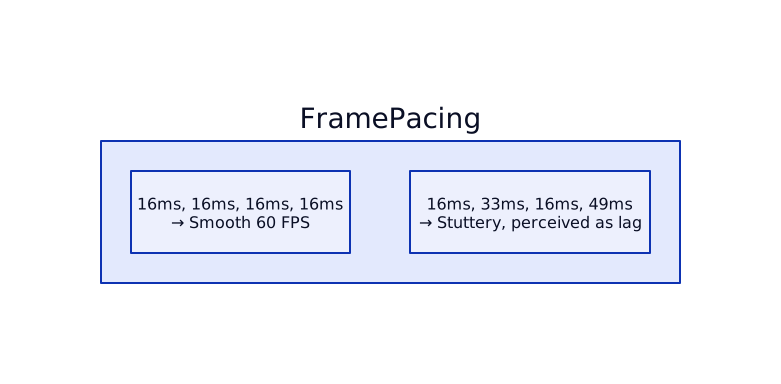
When your app misses a vsync, you get: - 1 frame drop: 33ms (visible stutter) - 2 frame drops: 50ms (very noticeable) - Jitter: Inconsistent frame times cause perception of lag even at “60 FPS”
X11’s compositing model increases jitter because: 1. Every frame goes through the X server (extra hop) 2. Damage tracking is coarse (redraws more than necessary) 3. VSync is mandatory (can’t present early)
Wayland reduces jitter by: 1. Direct buffer passing (no X server hop) 2. Precise damage regions (minimal redraws) 3. Optional vsync (compositor decides timing)
The Current State (2026)
| Component | X11 Status | Wayland Status |
|---|---|---|
| AMD/Intel GPU | Works, 60Hz cap | Works, uncapped |
| NVIDIA GPU | Works, 60Hz cap | Works (driver 535+) |
| Electron apps | Default, laggy | Optional, faster |
| KDE/GNOME | Stable | Default on most distros |
| Fractional scaling | Blurry | Sharp |
| HDR/VRR | Not supported | Experimental |
The war is mostly over. Wayland won. But the legacy remains: - NVIDIA users who never switched - Electron apps that still default to X11 - Users who learned “Wayland is broken” and never looked back
The Takeaway
Your 60Hz cap isn’t a driver bug. It’s X11’s architecture — a 40-year-old design that forces every app through a centralized compositing pipeline with mandatory vsync waits.
The fix exists (Wayland). The politics (NVIDIA’s disinterest, Electron’s X11 default, users’ inertia) kept it from adoption for 15 years.
If your desktop feels laggy at 60 FPS, the problem isn’t your GPU. It’s the display server.